


DO Sensor error
PACKMASTER Model:RO-105S
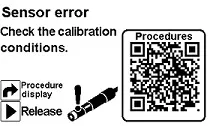
The "DO sensor error" message is displayed when the output of the oxygen sensor is unstable during span calibration, zero calibration, or measurement. The following may be considered as factors of unstable during calibration or measurement.
-When the ambient temperature changes drastically.
-When the oxygen sensor membrane is damaged.
Check the details and troubleshoot with the following actions.
| Is the oxygen sensor correctly mounted? | Securely connect the oxygen sensor (Model:WA-BRM5) to “DO IN” on the back panel of the PACK MASTER. |
|---|---|
| Has the temperature of the measurement environment changed drastically? | The device cannot be calibrated correctly if the temperature changes drastically (Temperature difference between storage site and measurement site, temperature change caused by air conditioning, etc.). Calibrate the span after allowing the temperature to stabilize sufficiently in a stable ambient temperature, such as before turning on the air conditioning. |
| Was the membrane on the tip of the oxygen sensor facing upward when calibrating the span? | Point the membrane on the tip of the oxygen sensor downward or to the side when calibrating the span. |
| Was stabilizing time taken after replacing the oxygen sensor membrane and electrolytic solution? | When the membrane and electrolytic solution have been replaced, the membrane tension is not stable, so allow the membrane to settle for several hours to 12 hours. Calibrate after this stabilizing time. |
| Is the oxygen sensor’s membrane surface damaged or wrinkled, etc.? | Refer to the “Maintenance Guide” enclosed with the oxygen sensor and replace the membrane and electrolytic solution with new ones. After replacing, allow the parts to stabilize for several hours to 12 hours or more, and then calibrate. |
| Is the membrane on the tip of the oxygen sensor contaminated? | Clean the oxygen sensor and remove the contaminants. If the contaminants cannot be removed, replace the membrane and electrolytic solution with new ones. After replacing, allow the parts to stabilize for several hours to 12 hours or more, and then calibrate. |
| Is the oxygen sensor being used after being suspended for a long time (several months)? | The oxygen sensor membrane and electrolytic solution may be degraded. Replace the membrane and electrolytic solution with new ones. After replacing, allow the sensor to stabilize for several hours to 12 hours or more, and then calibrate it. |
| If the symptoms do not improve after taking the above actions, the oxygen sensor may have reached its life. | Order a new oxygen sensor and replace the old one. |
■If the symptoms are not resolved even after taking the above actions and confirming the calibration conditions, the oxygen sensor may have reached its life.
-Replace the oxygen sensor (Model: WA-BRM5) with a new part. Contact and orderto the dealer from which you purchased the product.
■If the problem persists even after replacing the oxygen sensor
→ There is a possibility of malfunction of the main unit and it needs a request for repairs. Please contact the dealer from which you purchaesd the product.